
Revisiting the Original Factorio on GKE Wishlist
Last year I wrote about one of my favorite games of all time, Factorio, and hosting a dedicated server on GKE. It was an okay solution, though far from optimal—it relied on CronJobs to turn the server on at 5 PM and off at midnight—but it served me and my friends over the course of a long campaign before I retired that cluster. At the very end of that post, I left a wishlist item:
If I could add one feature, it would be the on-demand scaling up and down as we connect and disconnect from the server. I haven’t cracked that bit yet, and I figure that the single-digit dollars it would save me are probably not worth spending too much time thinking about. But if you’ve got a solution, I’d love to hear it!
Now that my friends and I are looking to dust off our Factorio server and start a new 2.1 campaign, that got me thinking: how would I revisit this solution today with better tools? Lately I’ve been spending a lot of time with Agent Substrate on GKE (like in my Agent Storybook Project). Substrate was originally designed with AI agents, code interpreters, and RL environments in mind, but at its core, it’s great at managing any stateful workload that needs fast checkpointing and restore.
Factorio seemed like a great candidate because holding onto the game server state is critical, and we want it to hibernate when nobody is online and resume very quickly when players connect. So that got me thinking: is this actually a good fit, or am I just reaching here?
Can a Factorio Server Be an Agent Substrate Actor?
So what exactly is a Substrate Actor? At its core, an Actor is a sandboxed workload that we can turn on and off on demand and have it resume right where it left off in about a second. For an intermittently used multiplayer game server, that sounds ideal. We give Substrate an ActorTemplate (manifests/factorio-template.yaml.tmpl) that builds a pre-warmed Golden Snapshot of the server, have it write save files to a persistent durableDir volume (/factorio), and configure SNAPSHOT_CONTENT_SCOPE_FULL so both the /factorio directory and the entire gVisor sandbox memory state get shipped off to Cloud Storage whenever the server is suspended—letting us stop paying for compute when nobody is playing.
On the surface, this even opens up the possibility of hosting multiple Factorio worlds on the exact same hardware. As long as only one world is active at a time, we can keep the rest of them hibernated in Cloud Storage and multiplex a single worker pod across all of them.
However, there’s a catch. The atenet-router component that Substrate uses to route traffic to Actors is an L7 Envoy proxy designed for TCP traffic only—specifically HTTP, gRPC, and WebSockets routed via the ate-target-actor header. Even worse for a game server, Substrate’s worker network setup (ateomnet) installs an nftables firewall rule inside the worker pod that explicitly drops all non-DNS UDP packets (dport != 53) entering or leaving the Actor’s network namespace. And Factorio speaks pure UDP to all of its clients. That became the first big obstacle I had to overcome.
Architecture Overview: Bridging Stateful UDP into an HTTP-Only Sandbox
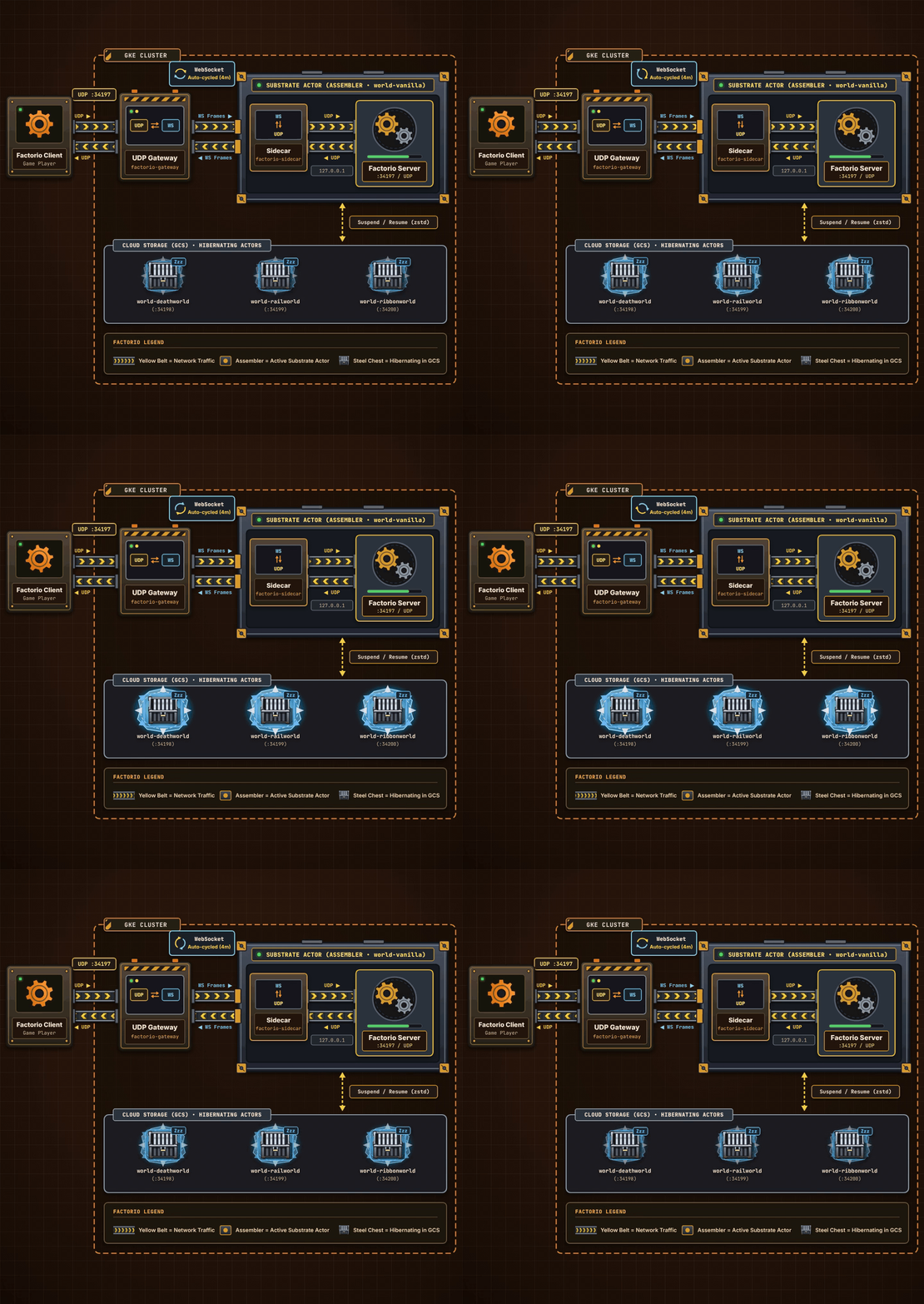
I needed a way to get player UDP datagrams through Substrate’s L7 router into an Actor—triggering an automatic wake-up if the Actor was suspended—and then turn them back into the UDP packets the Factorio server expects, without modifying a single line of Agent Substrate. It turns out there’s really only one choice: WebSockets.
The core of the solution is a pair of lightweight Go binaries:
- An always-on UDP Gateway (
cmd/factorio-gateway): Listens for UDP connections from Factorio game clients on nodehostPorts (34197,34198, …), filters out single-packet internet port scanners, buffers the client’s initial handshake packet, and opens a WebSocket tunnel throughatenet-router(/ws) with the headerate-target-actor: factorio/<world>. Just dialingatenet-routerwith that header causes Substrate to automatically wake (ResumeActor) the target Actor! - An in-Actor Sidecar (
cmd/factorio-sidecar): Runs inside the gVisor Actor sandbox right alongside the unmodifiedfactoriotools/factorioserver container. Because both containers share the same network namespace (127.0.0.1), the sidecar accepts the WebSocket stream on port80and forwards the unpacked UDP datagrams over loopback (127.0.0.1:34197/UDP) to Factorio—completely bypassing the externalnftablesUDP drop rule!
To make sure Factorio can tell multiple connected players apart, every WebSocket binary frame prefixes the raw UDP payload with the player’s source IP:port (internal/tunnelproto/frame.go), and the sidecar allocates a dedicated local ephemeral UDP socket (127.0.0.1:<port_i>) per player (cmd/factorio-sidecar/main.go). And because atenet-router enforces a 5-minute Envoy route timeout, the gateway transparently rotates the WebSocket connection every 4 minutes while the sidecar keeps those local UDP sockets open across rotations.
Multi-World Multiplexing on a Single Worker Pod
Once the UDP-over-WebSocket bridge was working, it opened up a lot of fun possibilities. Rather than having a single Factorio world tied to a dedicated Persistent Disk, we can host multiple worlds at the same IP address and switch between them just by changing the port number we connect to in the Factorio client:
:34197(factorio/world-vanilla) — Super-Dense Megabase:34198(factorio/world-deathworld) — Deathworld:34199(factorio/world-railworld) — Rail World:34200(factorio/world-ribbonworld) — 64-Tile Ribbon World
You could add as many as you want, and swap between them just by changing port (or figuring out your own networking/routing system with domain names, etc…)
All four worlds share a single 1-replica WorkerPool pod. When you connect to :34198 while world-vanilla is sitting idle on the worker pod, the gateway automatically calls /prepare-suspend on world-vanilla’s sidecar (which runs an RCON /server-save over 127.0.0.1:27015), calls SuspendActor to ship world-vanilla’s memory and save file to Cloud Storage, and wakes world-deathworld into the exact same worker pod in a couple of seconds.
Meanwhile, the sleeping worlds sit silently in Cloud Storage as compressed zstd archives (~46 MB per world, or ~250 MB total for all four worlds plus the Golden Snapshot)—which works out to less than a penny a month in storage costs—and wake back up nearly instantly whenever someone connects.
Scale-to-Zero / Spot Nodes
Finally, I decided to tackle a true Scale-to-Zero setup using Substrate and GKE. Suspending the Substrate Actor frees up the worker pod, but if we leave a warm WorkerPool pod (replicas: 1) running 24/7, we’re still paying for a worker node to sit in the background waiting to wake an Actor up quickly.
To eliminate that idle worker cost, factorio-gateway runs a two-stage idle reaper (idleReaperLoop in cmd/factorio-gateway/main.go):
- 10-minute Actor idle timeout (
--idle-timeout=10m): While a world isRUNNING, the gateway tracks outbound Factorio UDP replies (lastOutboundReply—so random internet UDP scanners can’t keep the server awake!). After 10 minutes with zero Factorio replies, the gateway triggers an RCON/server-saveand callsSuspendActorto freeze the world to Cloud Storage. - 2-minute WorkerPool scale-to-zero (
--workerpool-idle-timeout=2m): Once all worlds have beenSUSPENDEDfor 2 minutes, the gateway calls the in-cluster Kubernetes API to patchWorkerPool/factoriofromreplicas: 1down toreplicas: 0(maybeScaleDownWorkerPool). With the worker pod gone (and theateletDaemonSet markedsafe-to-evict: "true"), GKE’s Cluster Autoscaler (--autoscaling-profile=optimize-utilization) removes then2-standard-2Spot worker node completely.
The next time someone sends a Factorio UDP connection request, activateWorld scales WorkerPool/factorio back from 0 to 1 (ensureWorkerPoolScaledUp). That first cold connect takes ~60–90 seconds while GKE provisions a fresh Spot node, and once the node is up, switching between any of the four worlds is back to ~1.5 seconds.
(From cmd/factorio-gateway/main.go and idleReaperLoop)
So… it’s not perfect, we could warm the pool with a webhook from Discord, or maybe a simple Cloud Run service, but all things considered, it seems like an OK tradeoff. And it’s worked every time I’ve tested it so far!
if st == WorldStateRunning {
	allSuspended = false
	idleDuration := now.Sub(lastActivity)
	if idleDuration >= gw.cfg.IdleTimeout {
		slog.Info("No Factorio UDP traffic for idle timeout; suspending Actor",
			"actor", wt.spec.ActorRef(),
			"idle_duration", idleDuration.Round(time.Second),
		)
		_ = wt.suspendNow(ctx, "idle-timeout")
	}
} else if st != WorldStateSuspended {
	allSuspended = false
} else if changeTime.After(latestSuspendedChange) {
	latestSuspendedChange = changeTime
}

// Once all worlds are SUSPENDED for --workerpool-idle-timeout (default 2m),
// scale WorkerPool/factorio down to 0 so GKE Cluster Autoscaler removes the Spot node.
if allSuspended && !gw.upgradeInProgress.Load() {
	suspendedFor := now.Sub(latestSuspendedChange)
	if suspendedFor >= gw.cfg.WorkerPoolIdleTimeout {
		gw.maybeScaleDownWorkerPool(ctx, now, suspendedFor)
	}
}
Combined with a few other infrastructure tweaks in hack/setup-cost-optimized-pools.sh—running the lightweight Substrate control plane and factorio-gateway on a single e2-medium Spot node, rightsizing the default Postgres volume (10Gi), and using direct node hostPorts instead of a LoadBalancer—the economics change completely. Running an always-on game server cluster on GKE 24/7 is just too expensive for a hobby project, but with Agent Substrate and scale-to-zero Spot nodes, it’s roughly 97% cheaper and scales effortlessly—making it basically free to host dozens (or more) of Factorio worlds on demand (rough us-central1 estimates):
| Setup | Monthly Idle | Active Rate | ~20 hrs/mo Total | Summary |
|---|---|---|---|---|
| Naive 24/7 Cluster (2x c3-standard-4, 500Gi PVC, LoadBalancer) |
~$305/mo | ~$0.42/hr | ~$305/mo | Always-on nodes, no scale-to-zero—too expensive for a hobby project. |
| Substrate + Scale-to-Zero Spot (1x e2-medium Spot control, 0 -> 1 n2-standard-2 Spot worker, hostPort) |
~$9.51/mo | ~$0.03/hr | ~$10.09/mo | ~97% cheaper. Scale-to-zero worker, Spot VMs, and pennies in GCS to hibernate dozens of worlds. |
Proving Stateful Persistence Across World Swaps
Let’s watch that demo video again, and dive in to what exactly is happening.
As you can see, the first time I connect to :34197, it wakes up world-vanilla and we can run around in it and make changes then disconnect and connect to :34198 (world-deathworld), which saves and evicts the first world to Cloud Storage and loads the second world onto the exact same worker pod. Since this is the first time we’ve connected to world-deathworld it plays the animation for starting a new game.
Then we connect back to the original world on :34197, and the world resumes from Cloud Storage nearly instantaneously (~1.5 seconds) and all our changes are still there. Once everyone disconnects, after 10 minutes of silence the Actor suspends to GCS, 2 minutes later the WorkerPool scales to 0, and GKE removes the Spot worker node from the cluster so I stop paying for it.
Check Out the Code
All of the source code, Kubernetes and Substrate manifests, cost-optimization scripts, and end-to-end verification tools are live on GitHub at arbrown/factorio-substrate:
cmd/factorio-gateway/main.go— Always-on UDP-to-WebSocket ingress gateway, single-worker world multiplexer, two-stage idle reaper,WorkerPoolautoscaler, and proactive/reactiveActorTemplateupgrader.cmd/factorio-sidecar/main.go&worlds.go— In-actor loopback UDP bridge, RCON/prepare-suspendsave barrier, and per-world map presets.internal/tunnelproto/frame.go— WebSocket binary wire framing and Factorio 2.x UDP header/version parser.manifests/factorio-template.yaml.tmpl&manifests/factorio-substrate.yaml.tmpl— SubstrateActorTemplate,WorkerPool, andfactorio-gatewaymanifests.TRADEOFFS.md— Deep-dive notes on all 14 architectural trade-offs and gVisor/networking gotchas solved along the way.
I’ll keep the repo up to date as we go through this next Factorio campaign—and now the factory can finally sleep when we’re not playing, and wake itself back up the moment we connect!