

In the first post of this series, I introduced the Agent Storybook Project (ASP), an open-source multi-agent system on GKE that adapts public-domain classics into illustrated children’s books. Last time, I instrumented the whole thing with OpenTelemetry to find and fix hidden bottlenecks in the agent loop.
This time, I’m making an architectural shift and isolating the agentic part from the backend that orchestrates it. For this, I’m using Agent Substrate to manage the agents. This gives us a few important benefits. First, it isolates each agent from the web server so a crash in one won’t take down the other. Second, it lets us start up (and as a bonus, resume!) agent workloads from a golden snapshot (a saved memory image of an already-initialized container). This matters more for large-scale agents that are starting from a known point thousands of times in a row, like for RL training.
I just put up two new PRs on the repo: one that moves pipeline runs into isolated Agent Substrate actors, and a follow-up PR that adds crash detection and checkpoint recovery. Let’s look at why the original setup needed to change, and what it takes to get Agent Substrate up and running in a project like this.
Before: Everything in One Pod (Why That Was a Bad Idea)
When I built the first prototype of the Storybook Project, I took the path of least resistance to get it working; just shove everything in the same process (at one point, even the frontend was serving from there!).
- The backend API and the agents were sharing a process: The backend API should be a way to start a book generation, but it doesn’t necessarily need to coordinate every step of the process. What if one agent eventually does something unexpected and crashes? What if eventually the composition process is so computationally expensive that it takes down a run (after fighting with Gemini enough on this, I’m convinced that storybook layout is NP-hard)? I don’t want that to bring down every other run. It’s best to isolate the agents from the other parts of the stack.
- In-memory state locked us to a single pod: Active sessions and progress queues lived in Python dictionaries (
_sessions,_queues,_tasks) right inside the FastAPI process. That meant we were stuck atreplicas: 1. Worse, if I pushed a tiny CSS or API fix and Kubernetes rolled the backend pod, every in-flight book generation was unceremoniously killed mid-story. - Zero isolation between agent runs: Every user’s storybook session ran in the exact same container with the same filesystem and memory space. Right now the agents only call pre-defined tools, but as I give them more autonomy (like writing custom code to lay out a tricky page), I really want each agent locked in its own gVisor sandbox so one weird run can’t mess with another (or with the web server itself).
After: Giving Every Session Its Own Substrate Actor
To fix this, I used Agent Substrate to split the web backend from the actual agent work.
Agent Substrate introduces the concept of an Actor to manage the lifecycle of your agent. I am only scratching the surface of what you can use this pattern for; it can also be used to stack hundreds (or even thousands) of agents onto a single Node through clever snapshotting and restoration, and to auto-resume an agent using a gateway to hold an incoming request until the right actor is up and running and ready to receive it.
Instead of running the ADK pipeline inside FastAPI, each book generation now gets its own isolated Substrate Actor running in a gVisor sandbox:
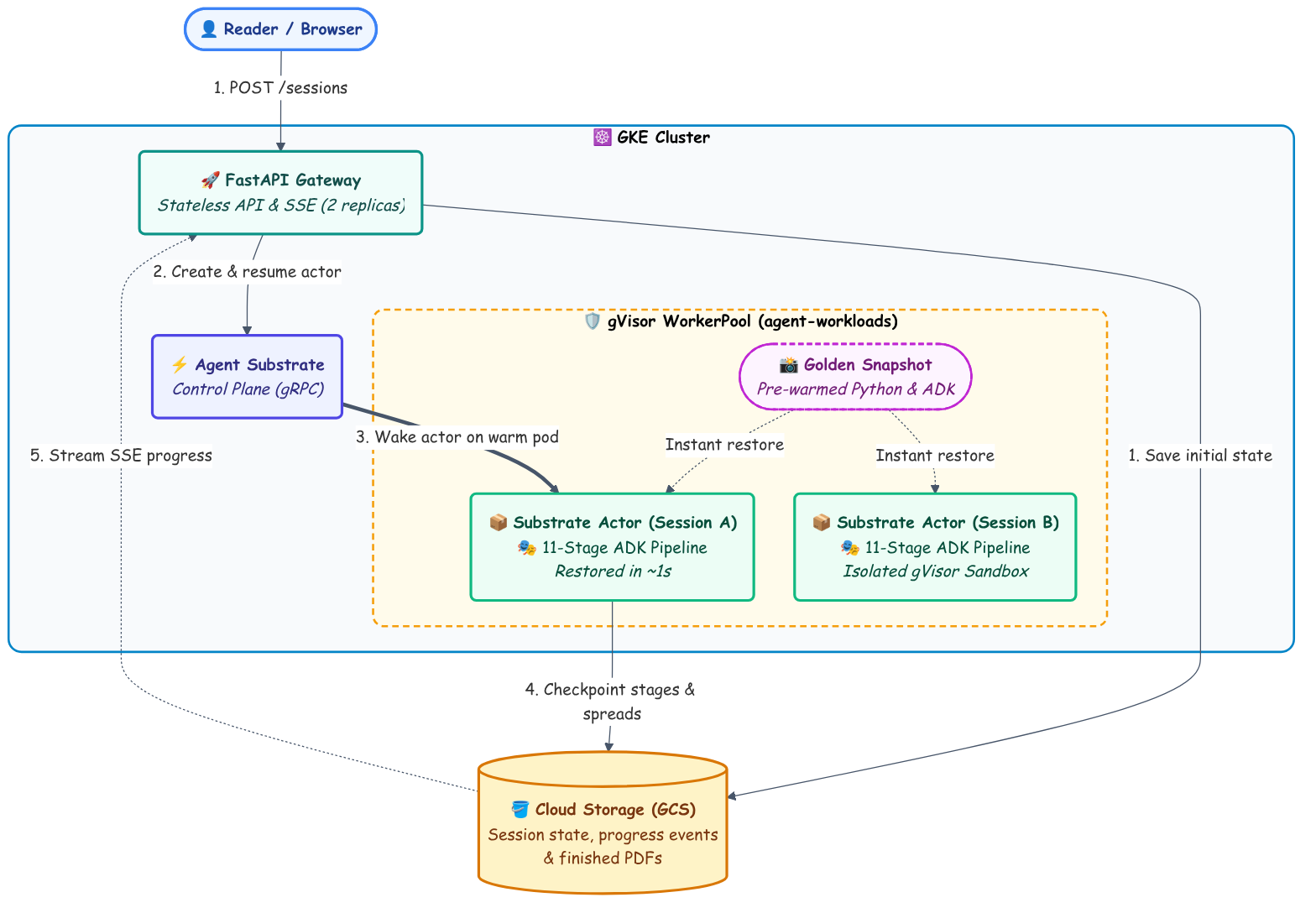
I like this pattern better than just spinning up a raw Kubernetes Job for every request.
How to Set It Up: The Code
If you want to take an existing Python agent and move it into Agent Substrate actors, you really only need three pieces.
1. Define the ActorTemplate
First, we give Substrate an ActorTemplate that describes how to run and snapshot our agent container.
There are two neat pieces in this YAML:
readyz: Tells Substrate what endpoint to poll when building the Golden Snapshot. As soon as/readyzreturns200, Substrate freezes the container into a snapshot stored in GCS.systemInfovolume: When Substrate restores that snapshot for a real user session, it mounts the actor’s assigned name and namespace as plain text files in/run/ate/metadata. That’s how the restored container discovers which session it’s supposed to run!
(From k8s/substrate/actortemplate.yaml)
# Created via: kubectl ate create actor-template -f k8s/substrate/actortemplate.yaml
metadata:
  atespace: asp
  name: asp-runner
workerSelector:
  matchLabels:
    workload: asp-runner
containers:
- name: runner
  image: ${ASP_RUNNER_IMAGE_DIGEST}
  volumeMounts:
  - name: metadata
    mountPath: /run/ate/metadata
  readyz:
    httpGet:
      path: /readyz
      port: 8080
    timeoutSeconds: 60
volumes:
- name: metadata
  systemInfo:
    dataSources:
    - actorMetadata:
        items:
        - field: ACTOR_METADATA_FIELD_NAME
          path: actor-name
        - field: ACTOR_METADATA_FIELD_ATESPACE
          path: actor-atespace
resources:
  limits:
  - name: cpu
    quantity: "2"
  - name: memory
    quantity: 4Gi
snapshotsConfig:
  onPause: SNAPSHOT_CONTENT_SCOPE_FULL
  onCommit: SNAPSHOT_CONTENT_SCOPE_FULL
  storageLocation: gs://${SUBSTRATE_STATE_BUCKET}/asp/
sandboxConfig:
  sandboxClass: SANDBOX_CLASS_GVISOR
  configName: asp-gvisor
2. Pre-Warm the Snapshot in Python (runner.py)
Next, I added a standalone entrypoint (src/storybook/runner.py) for the actor container.
The trick here is doing all the slow Python imports at the very top of the file before starting the /readyz server. That way, the expensive module initialization happens once when the Golden Snapshot is created, not when a user is waiting.
Once /readyz is up, the script loops on /run/ate/metadata/actor-name. While it’s being snapshotted, it lives in the ate-golden namespace. The moment Substrate restores it into the asp namespace with a session ID as its name, the loop wakes up and runs the pipeline!
(From src/storybook/runner.py)
# Pre-import heavy modules before /readyz responds so the Substrate golden
# snapshot captures a warm Python interpreter with ADK, GenAI, GCS, and WeasyPrint loaded.
import weasyprint
from google import genai
from google.cloud import storage
from storybook.agents.pipeline import run_pipeline

METADATA_DIR = Path("/run/ate/metadata")
GOLDEN_ATESPACE = "ate-golden"


async def _wait_for_actor_assignment() -> str:
    """Wait until the actor is restored out of ate-golden and assigned a session ID."""
    while True:
        atespace = (METADATA_DIR / "actor-atespace").read_text().strip()
        actor_name = (METADATA_DIR / "actor-name").read_text().strip()
        if atespace and atespace != GOLDEN_ATESPACE and actor_name:
            return actor_name
        await asyncio.sleep(0.05)


async def _async_main() -> int:
    _start_readyz_server(port=8080)
    session_id = await _wait_for_actor_assignment()

    # Re-seed PRNG after snapshot restore so cloned actors don't share random state!
    random.seed(os.urandom(16))
    return await execute_session(session_id=session_id)
(Note that random.seed(os.urandom(16)) call after restore: if you restore multiple actors from the same memory snapshot without re-seeding the random number generator, they all wake up with the exact same RNG state! Ask me how I know 😏.)
3. Swap asyncio.create_task for ate.create_actor
Finally, back in the FastAPI app (src/storybook/api/routes.py), creating a session gets a lot simpler. Instead of juggling in-memory queues and background tasks, we save the initial state to GCS and ask Substrate to spin up an actor named after the session_id:
(From src/storybook/api/routes.py)
# BEFORE: Everything ran inside the FastAPI pod's memory and event loop
# q: asyncio.Queue = asyncio.Queue()
# _sessions[sid] = state
# _queues[sid] = q
# _tasks[sid] = asyncio.create_task(_run(sid, state, q))

# AFTER: Save initial state to GCS and spin up an isolated Substrate Actor
@router.post("/sessions", response_model=SessionResponse, status_code=202)
async def create_session(body: CreateSessionRequest) -> SessionResponse:
    state = PipelineState(config=body.config, started_at=_now())
    sid = state.session_id

    await _persist_session(state)
    await asyncio.to_thread(gcs.save_progress_events, sid, [], False)

    actor_info = await ate.create_actor(
        template=settings.substrate_template,  # "asp-runner"
        atespace=settings.substrate_atespace,  # "asp"
        name=sid,
    )
    log.info("Provisioned Substrate Actor for session %s: %s", sid, actor_info)

    return _to_session_response(state, is_running=True)
Under the hood, ate.create_actor() is a thin gRPC wrapper in src/storybook/substrate/client.py that creates the actor from the asp-runner template, attaches an egress policy, and resumes it onto a warm worker pod in the asp-workerpool. I had Gemini write me a client SDK because Substrate is so new there isn’t a ready-made one for Python (yet!).
Because the Golden Snapshot already holds the initialized Python runtime and pre-imported dependencies in memory, all of those heavy startup costs are paid ahead of time when the template is created. Waking up an actor on a warm worker for a new user request happens in about a second (though this is with a naive setup, and I think I could get it even faster!):
Provisioned and resumed Substrate actor asp/b895518f-cb2b-4e78-98a4-ca0893de2067 from template asp-runner in 1108.0 ms (resume_ms=1102.9, state=ACTOR_STATE_RUNNING, worker_pod=asp-workerpool-7bfd485658-nwktc, resume=False)
The FastAPI gateway issues the gRPC call, Substrate maps the memory snapshot onto a worker pod, and within ~1,100ms the runner is unpaused and executing the session!
Bonus Wins: Crash Recovery & Multi-Replica Streaming
Once the agent pipeline was decoupled from the web server, a bunch of resilience improvements in PR #4 fell into place naturally:
- Surviving backend rollouts: Because actors write their progress events to GCS (
GCSProgressSink) and the SSE stream uses event sequence numbers (Last-Event-ID), I scaledstorybook-backendup toreplicas: 2. Now if a backend pod restarts while you’re watching a book build, the browser automatically reconnects to the other replica without losing its place, and the actor never even notices. - Detecting crashed actors & resuming mid-book: Since Substrate tracks the lifecycle of every actor, the backend can check
ate.get_actor()while streaming. If an actor crashes mid-run, the UI immediately surfaces a “Resume” button that spins up a brand-new actor, loads the completed stages and spreads from GCS checkpoints, and picks up right where the old actor left off. So far I’ve only tested this by force-crashing a pod in the middle of a run, but it does work! I can’t wait (?) to see this happen for some unknown crash reason!
What’s Next
We now have full OpenTelemetry tracing and isolated, snapshot-restored actors for every storybook run! I have a bunch more ideas for how to improve this agent and make it more enterprise-ready 😉.
Keep an eye on the asp tag for the next update, and feel free to check out the code or open an issue on the GitHub repo!
Helpful Links
- Agent Substrate on GitHub
- Agent Substrate on GKE
- Agent Storybook Project GitHub Repository (PR #3: Substrate Actors, PR #4: Resilience & Checkpoint Resume)
- Part 1: Introducing Agent Storybook Project
- Part 2: Observability in the Agent Storybook Project
- Four Shapes of Agent Workload (and Why Your Cluster Cares)
- GKE Agent Sandbox Documentation