
Introduction to Distributed RL Sandboxing on GKE
Reinforcement Learning (RL) is the cornerstone of modern AI training. Rather than train a model to produce an expected output, we verify if it has achieved a particular outcome. This is particularly important when building models for use in agents that make decisions and take actions rather than just produce text.
Why a Sandbox for RL?
In many RL workloads (like the one I’ll discuss below), we’re training a model for use in a coding workflow where it needs to write code and use tools (like git and grep) to accomplish a task like fixing a bug.
But training these agents presents a thorny problem. What if, while it’s learning, it makes a mistake? Like a really bad mistake. Say an agent decided that running rm -rf / was the best way to fix a bug? No file system, no problem! That might be an extreme example, but you need a way to isolate the actions of these agents from your real infrastructure—especially when that infrastructure has expensive accelerators attached to it.

A sandbox provides an isolated, secure environment where the agent can freely act without risking the host system or real-world data. It allows us to safely train agents on tasks that might otherwise be destructive or have unintended consequences.
The Codelab: High-Performance Distributed RL Sandbox
To help with this on GKE, I’ve put together a basic introductory codelab: High-Performance Distributed RL Sandbox.
Under the hood, GKE Agent Sandbox uses gVisor to intercept system calls and provide strong, kernel-level isolation. This ensures that even if an agent runs malicious or buggy code, it remains locked inside a secure playpen, unable to compromise the host node, the cluster, or your precious cloud credentials.
This codelab focuses on the how of setting up a basic, distributed sandboxing environment using Google Kubernetes Engine (GKE) and Agent Sandbox.
Here’s a high-level view of what we build in the codelab:
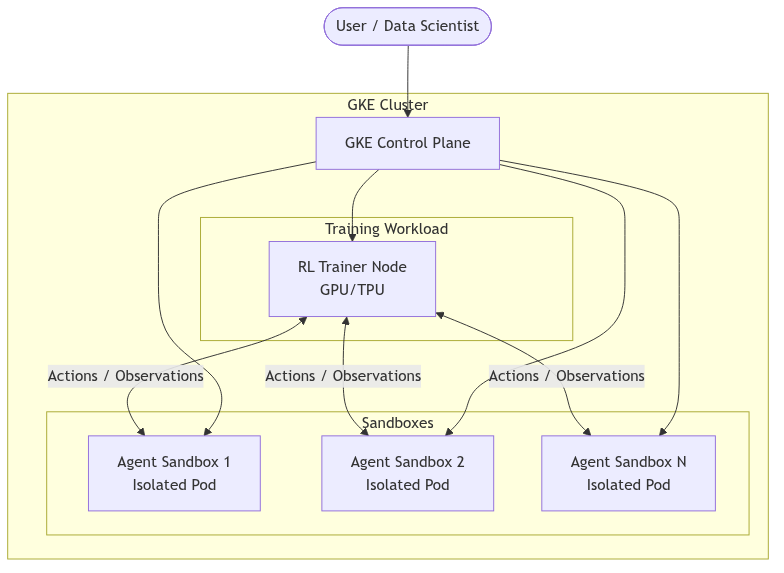
We’ll set up a GKE cluster with a special “Warm Pool” of sandboxes designed for a specific task. This Warm Pool keeps a specified number of pods ready to go, helping to prevent cold starts and ensure sandboxes are immediately ready for use. In the example, our sandbox is configured to enable the agent to fix a small bug in a Python application. That means our sandbox has the right source code and dependencies already installed. In larger jobs, you could have different sandbox environments for different tasks, and intelligently (and quickly) route your agent-in-training to the right pod.
To keep execution latency low and avoid overwhelming the Kubernetes control plane with constant pod creation, the orchestration plane (Ray) talks to a central Sandbox Router that manages and assigns pre-warmed sandboxes.
Importantly, the Python training job never addresses an individual sandbox pod by its IP or name. Instead, it connects directly to the central router service and dynamically requests a sandbox matching its specific requirements.
Here is a simplified preview of how this interaction works in Python:
from sandbox_client import SandboxClient

# Connect to the central router service
client = SandboxClient(base_url="http://sandbox-router.default.svc.cluster.local:8080")

# Request a secure, pre-warmed sandbox by specifying the environment template and warm pool
sandbox = client.create_sandbox(
    template="swe-bench-django",
    warmpool="swe-bench-django-warmpool"
)

# Safely execute the agent's code or tests within the isolated sandbox
result = sandbox.run_command("python manage.py test")
print(f"Exit code: {result.exit_code}")
print(f"Output: {result.stdout}")
What’s Next?
This codelab is just the beginning. It sets the foundational infrastructure. In future posts, I’ll dive deeper into more advanced RL concepts and explore sophisticated sandboxing techniques on GKE, like building a larger image library for your Sandbox Warm Pool or doing multi-turn training where the learning really starts to happen!

Ready to build your sandbox? Head over to the Codelab and get started!