

Let’s update my GKE agent with one of my original goals: separate users!
I planned this way back in the original post. I already updated the original agent to run each workload in its own gVisor-sandboxed actor, but all users were still walking through the exact same unauthenticated front door and dumping their books into one giant communal bucket.
I just merged the multi-user milestone, which puts Google OAuth in front of the app with Identity-Aware Proxy (IAP) and gives each session a short-lived, downscoped Cloud Storage token using IAM Credential Access Boundaries (CAB). This accomplishes a couple of things:
-
Users have to log in to use the application (sorry, we’re not in GA yet, so logins are limited to me and a few trusted testers! 😉)
-
Each user has their own set of storybook projects and cannot write to each other’s folders or see each other’s projects
Let’s look at how it works, a fun wrinkle with passing per-session tokens into snapshot-restored actors, and why scoping storage is only half the battle for true agent identity.
Before: One Giant Communal Bucket of Books
It was easy enough to build out a prototype that was only for me, but once I hosted it on GKE and started getting teammates to test it, it was definitely time to isolate users’ data. Here’s what was broken:
- Zero authentication at the front door: Anyone with the URL could kick off a book generation. In practice, this didn’t happen, but security through obscurity is not really a long-term plan.
- A single flat storage namespace (
sessions/{session_id}/): Every user’s prompts, intermediate JSON checkpoints, generated illustrations, and final PDFs lived in the same shared GCS hierarchy. - Over-privileged storage clients: Every Substrate Actor initialized its GCS client using the ambient
storybook-backendservice account, which had fullroles/storage.objectAdminacross the entire bucket. A path-handling bug in one session’s runner had full permissions to read or overwrite any other user’s storybooks and build artifacts (I’m keeping every build artifact like images, character bible, etc - who knows how valuable they will be in a future version of the agent!)
The Fix: OAuth at the Edge + Downscoped Tokens for Storage
To turn ASP into something multiple people can actually use at the same time, I split the fix into two layers:
- OAuth at the edge with GKE Identity-Aware Proxy (IAP): Instead of writing login pages and session cookie management in FastAPI, I enabled IAP on the GKE Ingress via a
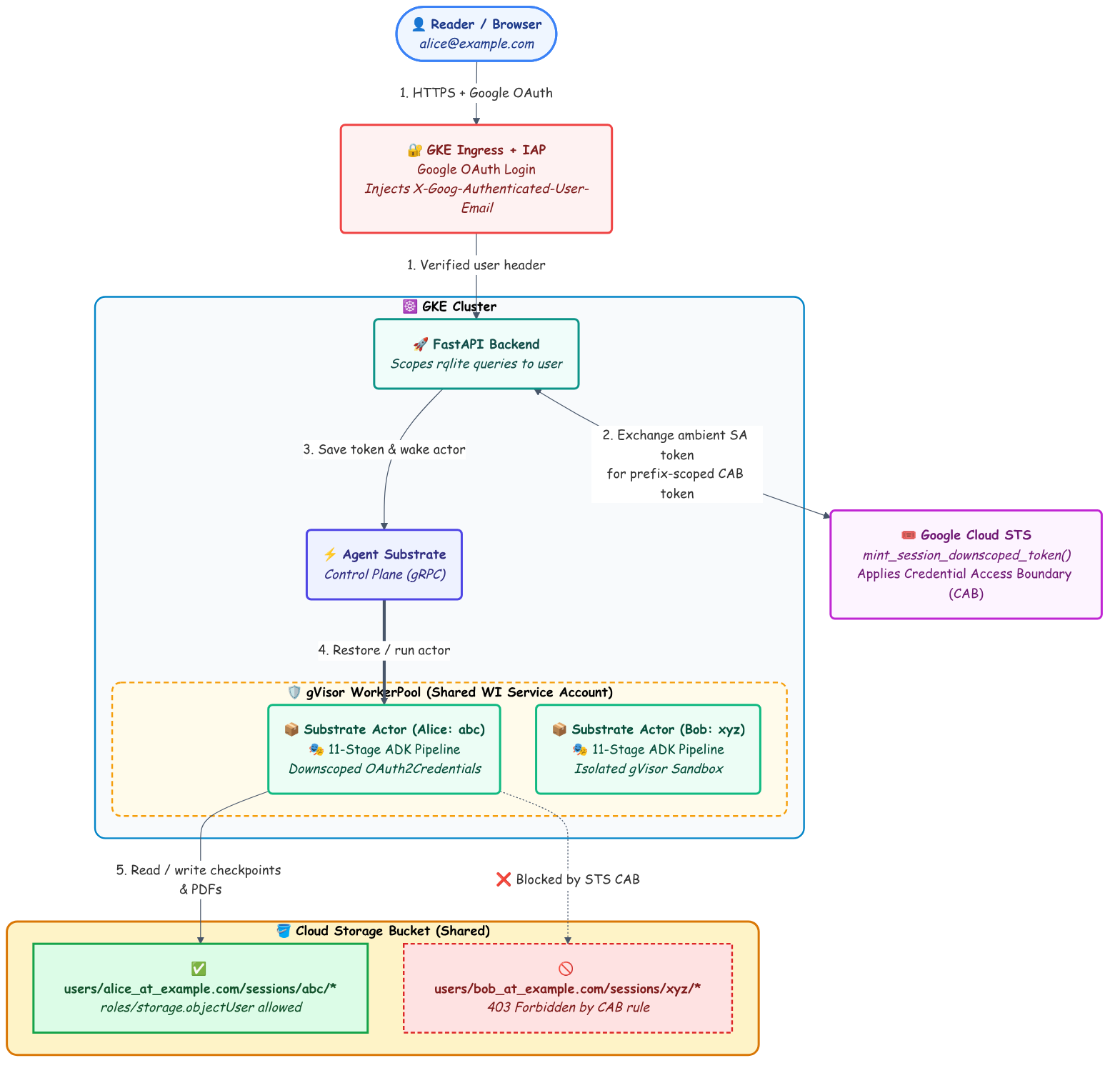
BackendConfig. Users log in with Google OAuth before a single packet reaches the cluster, and the load balancer injects their verified identity (X-Goog-Authenticated-User-Email) on every request. FastAPI reads that header and scopes allrqlitesession queries touser_email. - Per-user GCS prefixes + STS Credential Access Boundaries (CAB): Next, I moved all GCS object paths from
sessions/{session_id}/...tousers/{safe_email}/sessions/{session_id}/.... Before waking up a Substrate Actor, the backend calls Google Cloud’s Security Token Service (STS) to exchange its ambient credentials for a short-lived downscoped OAuth access token restricted by a Credential Access Boundary to only that user’s session prefix.
How to Set It Up: The Code
1. Identifying the User Behind GKE IAP (auth.py)
Adding IAP to a service running on GKE is super easy. In k8s/backend-config.yaml:
apiVersion: cloud.google.com/v1
kind: BackendConfig
metadata:
  name: storybook-backend-config
  namespace: default
spec:
  timeoutSec: 3600
  iap:
    enabled: true
    oauthclientCredentials:
      secretName: storybook-iap-secret
(Pro tip: if you put a Google Cloud Load Balancer and IAP in front of an SSE endpoint, raising timeoutSec isn’t quite enough on its own—if an LLM stage goes quiet for a minute, proxies still love to drop idle connections. I noticed this issue when I stopped getting live updates in the UI during storybook generation after I added IAP, so I also added a : keepalive\n\n SSE comment heartbeat every second in routes.py to keep the stream alive!)
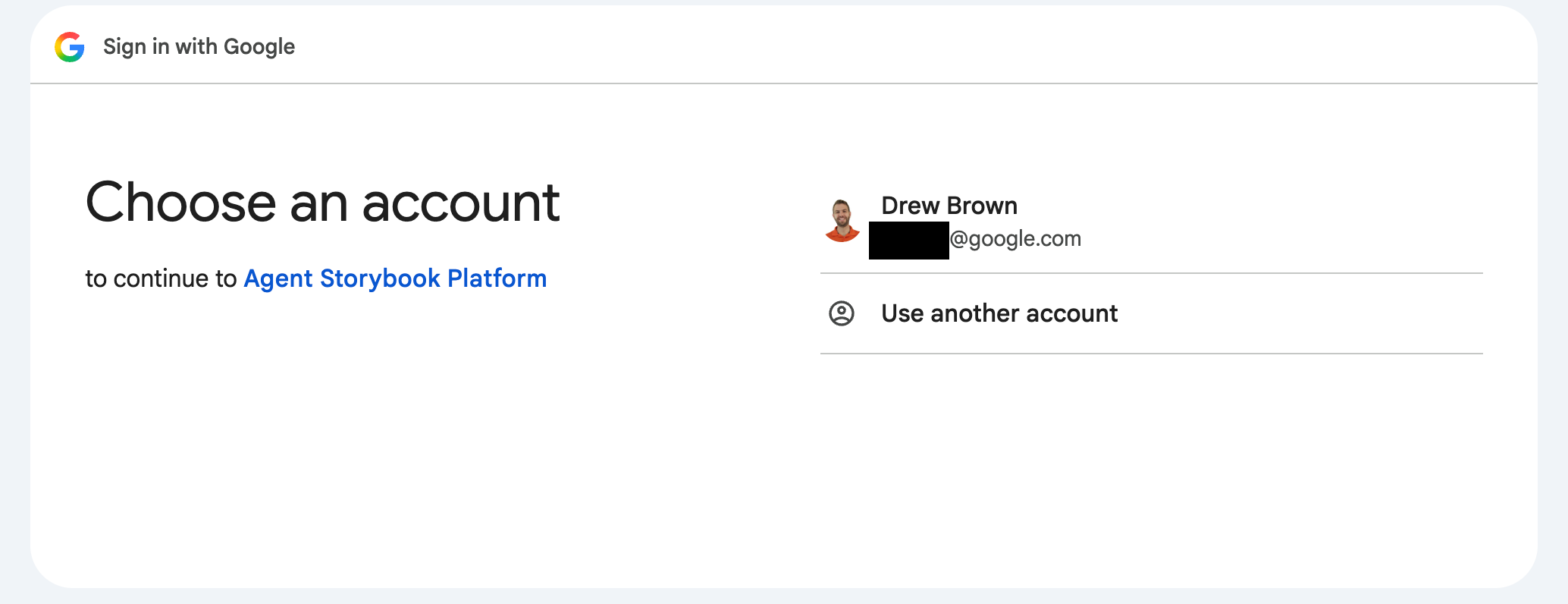
Once IAP is active, Google’s proxy authenticates the user and passes X-Goog-Authenticated-User-Email: accounts.google.com:user@example.com to the backend. In src/storybook/api/auth.py, we parse that header, sanitize the email so it’s safe to use in GCS object paths (alice@example.com → alice_at_example.com), and inject AuthenticatedUser into our FastAPI routes with Depends(get_current_user):
_SAFE_CHARS_RE = re.compile(r"[^a-z0-9._-]")


def sanitize_email_for_gcs(email: str) -> str:
    """Sanitize an email address for safe use in GCS object prefixes."""
    cleaned = email.strip().lower()
    if not cleaned or ".." in cleaned or "/" in cleaned or "\\" in cleaned:
        raise ValueError(f"Invalid email for GCS path: {email!r}")
    cleaned = cleaned.replace("@", "_at_")
    cleaned = _SAFE_CHARS_RE.sub("_", cleaned)
    return cleaned


class AuthenticatedUser(BaseModel):
    email: str
    auth_type: str  # "iap", "bearer", or "dev"

    @property
    def safe_email(self) -> str:
        return sanitize_email_for_gcs(self.email)


async def get_current_user(
    request: Request = None,
    x_goog_authenticated_user_email: str | None = Header(None),
    authorization: str | None = Header(None),
    x_dev_user_email: str | None = Header(None),
) -> AuthenticatedUser:
    # 1. Production behind GKE IAP: 'accounts.google.com:user@example.com'
    if x_goog_authenticated_user_email and x_goog_authenticated_user_email.strip():
        email = _parse_iap_email(x_goog_authenticated_user_email)
        return AuthenticatedUser(email=email, auth_type="iap")

    # 2. Bearer token fallback (if direct OAuth JWT is used)
    if authorization and authorization.strip():
        email = _parse_bearer_token(authorization)
        return AuthenticatedUser(email=email, auth_type="bearer")

    # 3. Local dev fallback (when DEV_AUTH_ENABLED=true)
    if settings.dev_auth_enabled:
        email = (x_dev_user_email or settings.dev_default_email).strip().lower()
        return AuthenticatedUser(email=email, auth_type="dev")

    raise HTTPException(status_code=401, detail="Authentication required")
(Note: For production apps where defense-in-depth matters inside the cluster network, you should also verify the cryptographic signature on the X-Goog-IAP-JWT-Assertion header so nothing inside the cluster can spoof the email header directly.)
2. Minting a Per-Session Downscoped GCS Token (iam.py)
When a user starts (or resumes) a book generation, the runner should only touch objects inside that session’s folder.
Instead of creating separate IAM service accounts for every user, we can use an STS Credential Access Boundary (CAB). We build a rule with a CEL expression (resource.name.startsWith(...)) that confines roles/storage.objectUser strictly to projects/_/buckets/{bucket}/objects/users/{safe_user}/sessions/{session_id}/, and exchange our backend’s ambient credentials at https://sts.googleapis.com/v1/token:
(From src/storybook/tools/iam.py)
def build_session_access_boundary(
    user_email: str,
    session_id: str,
    bucket_name: str,
) -> dict:
    """Build the STS Credential Access Boundary JSON payload for a user session.

    Confines `roles/storage.objectUser` on `bucket_name` strictly to objects under:
    `projects/_/buckets/{bucket_name}/objects/users/{safe_user}/sessions/{session_id}/`
    """
    safe_user = sanitize_email_for_gcs(user_email)
    safe_session = _validate_identifier(session_id, "session_id")
    safe_bucket = _validate_identifier(bucket_name, "bucket_name")

    object_prefix = (
        f"projects/_/buckets/{safe_bucket}/objects/users/{safe_user}/sessions/{safe_session}/"
    )
    return {
        "access_boundary": {
            "access_boundary_rules": [
                {
                    "available_resource": (
                        f"//storage.googleapis.com/projects/_/buckets/{safe_bucket}"
                    ),
                    "available_permissions": [
                        "inRole:roles/storage.objectUser",
                    ],
                    "availability_condition": {
                        "title": "SessionPrefixConfinement",
                        "expression": f"resource.name.startsWith('{object_prefix}')",
                    },
                }
            ]
        }
    }


def mint_session_downscoped_token(
    user_email: str,
    session_id: str,
    bucket_name: str,
) -> str:
    """Exchange backend default credentials for an STS CAB downscoped token."""
    cab_payload = build_session_access_boundary(
        user_email=user_email,
        session_id=session_id,
        bucket_name=bucket_name,
    )

    source_creds, _ = google.auth.default(scopes=[_CLOUD_PLATFORM_SCOPE])
    if not source_creds.valid or not source_creds.token:
        source_creds.refresh(google.auth.transport.requests.Request())

    resp = httpx.post(
        STS_TOKEN_URL,
        data={
            "grant_type": STS_GRANT_TYPE,
            "subject_token_type": STS_TOKEN_TYPE,
            "requested_token_type": STS_TOKEN_TYPE,
            "subject_token": source_creds.token,
            "options": urllib.parse.quote(json.dumps(cab_payload)),
        },
        headers={"Content-Type": "application/x-www-form-urlencoded"},
        timeout=10.0,
    )
    resp.raise_for_status()
    return str(resp.json()["access_token"])
3. Passing Fresh Credentials to a Frozen Snapshot
Here is where things got interesting. In Part 3, I set up Agent Substrate so that our runner container boots once, imports all its heavy Python libraries, and freezes into a Golden Snapshot.
So how do you pass a freshly minted, per-session OAuth token into a container whose process already started hours ago?
My first instinct was to pass ASP_USER_EMAIL and GCS_DOWNSCOPED_TOKEN as environment variables or annotations on the CreateActor gRPC request. Except… the Python process inside the snapshot is already running thanks to our Substrate golden image! Even if you could mutate container startup env vars after the fact, os.environ was initialized when the Golden Snapshot was taken. And Substrate’s systemInfo metadata volume intentionally only exposes system fields (actor-name, actor-atespace, and actor-uid).
To bridge the gap, FastAPI stashes the short-lived downscoped token in rqlite right before waking the actor. When the restored actor wakes up and reads its assigned session_id from /run/ate/metadata/actor-name, it pulls (user_email, downscoped_token) for that session and configures its GCS client with OAuth2Credentials(token=resolved_token):
(From src/storybook/runner.py)
    if not resolved_user or not resolved_token:
        db_user, db_token = await store.get_actor_credentials(session_id)
        resolved_user = resolved_user or db_user
        resolved_token = resolved_token or db_token
        if resolved_user or resolved_token:
            gcs.set_scoped_credentials(
                user_email=resolved_user or None,
                token=resolved_token,
            )
Wait: Isolated Folders ≠ True Agent Identity (Yet!)
This brings up an important architectural distinction that’s easy to gloss over when talking about agent identity and security.
What we built here gives us great application-level multi-tenancy and blast-radius guardrails:
- Every user gets a private library view in the UI—you can only see, stream, resume, or download your own storybooks.
- Storage is cleanly partitioned under
users/{user}/sessions/{session_id}/. - The
storage.Clientinside the runner uses a token that physically cannot read or write outside that session’s prefix—so an accidental path bug in our pipeline code will get a hard403 Forbiddenfrom GCS instead of clobbering someone else’s book.
What this is not (yet) is a hard security boundary against untrusted code inside the actor.
Why? Look closely at the WorkerPool box in the architecture diagram above:
- Shared ambient Workload Identity: Every Substrate Actor runs inside the shared
asp-workerpoolunder thestorybook-backendGKE Workload Identity service account, with the GKE metadata server (169.254.169.254) accessible so the ADK agents can call Vertex AI / Gemini. - Shared state store: Because the actor fetches its session credentials from
rqliteover the cluster network, any code running inside that pod could bypass our nicely-scopedstorage.Client, queryrqlitedirectly, or ask the metadata server for the underlying service account token.
Right now, that’s completely fine because our agents only execute our own deterministic Python code. But remember the Hummingbird and Bear shapes: the moment we let an agent run arbitrary LLM-generated code in an Agent Sandbox (say, writing custom Python scripts to fix a tricky page layout) or call external MCP tools on a user’s behalf, “handing the Python client a downscoped token inside a pod that still holds the master keys” isn’t enough.
To get true per-agent and per-user identity, the sandboxed actor shouldn’t have ambient Workload Identity or direct database access at all—credentials and tool execution need to be brokered outside the untrusted sandbox.
What’s Next
Piece by piece, my weekend storybook prototype is starting to look like a real cloud-native agent platform: we have OpenTelemetry tracing, snapshot-restored gVisor sandboxes with crash recovery, and now multi-user OAuth login with per-session downscoped storage tokens!
Keep an eye on the asp tag for the next update, and check out the code or open an issue on the GitHub repo!
Helpful Links & Tutorials
- Agent Storybook Project GitHub Repository (PR #5: Multi-User OAuth & Downscoped GCS Tokens)
- Enabling Identity-Aware Proxy (IAP) for GKE
- Securing Your App with Signed IAP Headers
- Downscoping Short-Lived Credentials with IAM Credential Access Boundaries
- Agent Identity and Access Management Overview
- Workload Identity Federation for GKE
- Codelab: Deploying Secure AI Agents on GKE
- Agent Substrate on GKE Documentation
- GKE Agent Sandbox Documentation
- Part 1: Introducing Agent Storybook Project
- Part 2: Observability in the Agent Storybook Project
- Part 3: Isolating Agents in the Agent Storybook Project with Agent Substrate